 Youssef Toufik
Film it. Your agent cuts it.
For solo creators who talk to a camera. Your AI agent syncs your mic, keeps your best takes, cuts the dead air and checks its own cuts. Mac or Windows. Resolve, Premiere or no editor at all.
My last 50-minute recording: a draft in 2 hours, a double-checked cut in 3.5. My part was three reviews.
Editing a talking-head video is not hard. It is long.
Fifty minutes of footage. The same sentence said four times. Pauses, stutters, a glance at your notes every minute. You know exactly what the cut should be. It still takes a day to get there.
The AI tools that promise to fix this cut silences by the transcript. Transcripts lie about pauses. So you get clipped words, jumpy joins, and an edit you redo by hand.
What this is
Edit Studio is the pipeline I edit my own long-form videos with, packaged for your AI agent. You do not need an editing app: it renders the finished video for you. If you have DaVinci Resolve Studio, it uses it, and every edit lands as a real timeline you can open, change and undo. If you work in Premiere Pro, you get the cut as a timeline you import.
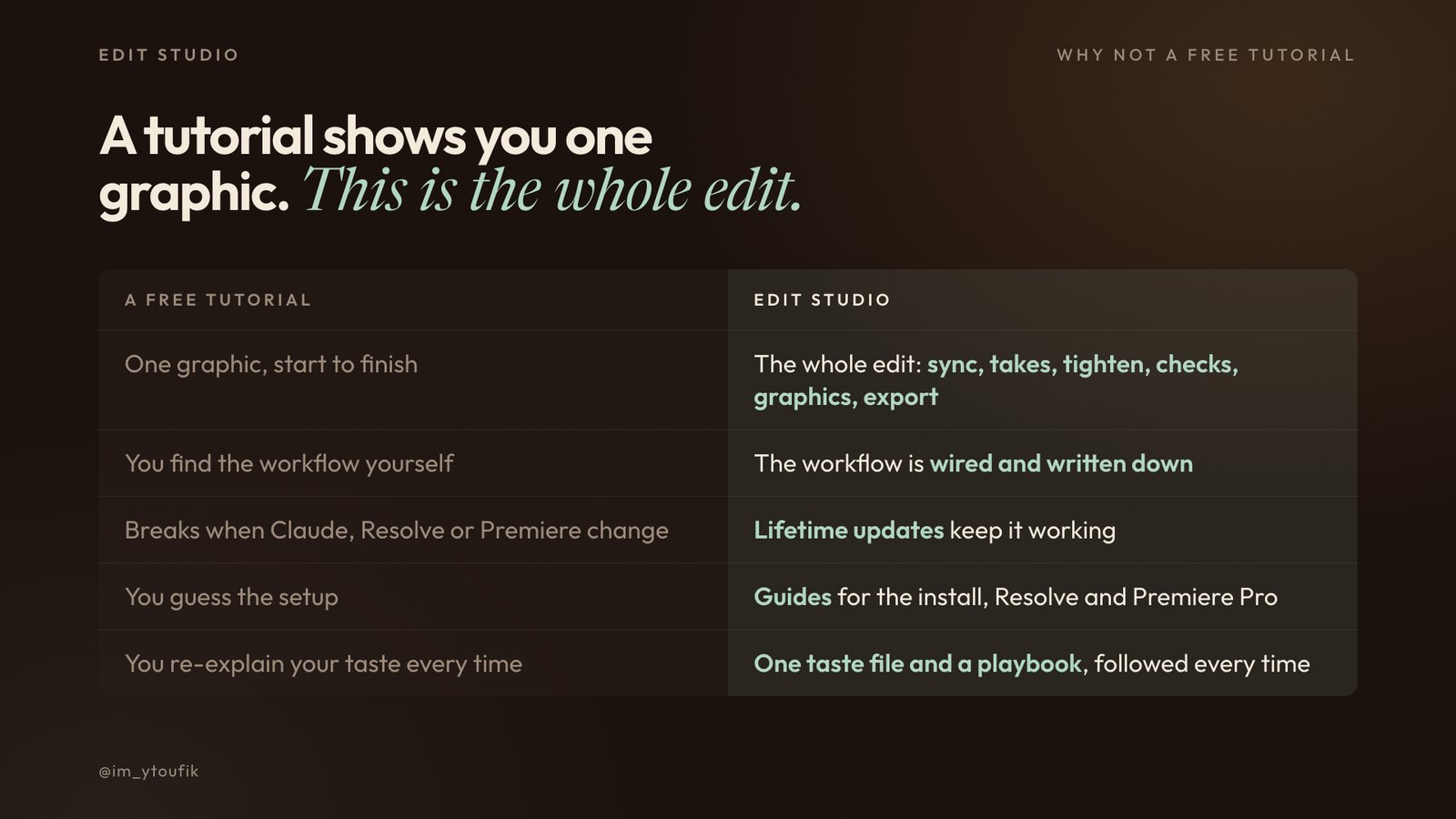
A tutorial shows you one graphic. This is the whole edit.
Free tutorials on making motion graphics with Claude are everywhere. They show you one graphic. Then you are on your own: find the workflow, wire the tools together, and fix it yourself the day Claude, Resolve or Premiere change.
Edit Studio is the workflow, already wired and written down, from raw footage to the finished video. Step-by-step guides take you through the install, DaVinci Resolve and Premiere Pro. And it does not go stale.
Lifetime updates
Buy once and every new version is yours, free. When I find a better way to edit my own videos, it goes into the kit: new templates and graphic styles, new steps, fixes for new versions of Resolve, Premiere and your agent. You get an email, and the new zip is waiting on your Start here page. You never go back to searching for tutorials.
Next on the list: graphic styles beyond the paper look, and a hero-object template for your first seconds.
How it works
1. Sync and transcribe. Your separate mic is locked to every camera clip, clock drift included. A word-level transcript keeps every retake.
2. Pick the takes. One agent per section keeps the last complete take of every line and removes the mistakes inside it. Anything it is unsure about becomes a marker for your ear.
3. You approve the draft. A draft and a review sheet of every cut. Nothing is committed without your yes.
4. Tighten. Dead air is judged by sound, not by the transcript. Every join follows one rule: cut after your voice decays, start on the next word's first strong frame. Audio cross fades, clean picture cuts.
5. It checks itself. A lost-words audit finds the quiet words a pause trimmer eats, often numbers and "not". Then fresh agents re-listen to every join.
6. You approve the cut. Fix a few joins by hand and the system measures your edits and applies the same rule to the rest.
7. Motion graphics (optional). Templates rendered as transparent overlays over your real cut, with their own sound effects. Every stretch where you read your notes gets a full-screen graphic. You vote on each one on a review page.
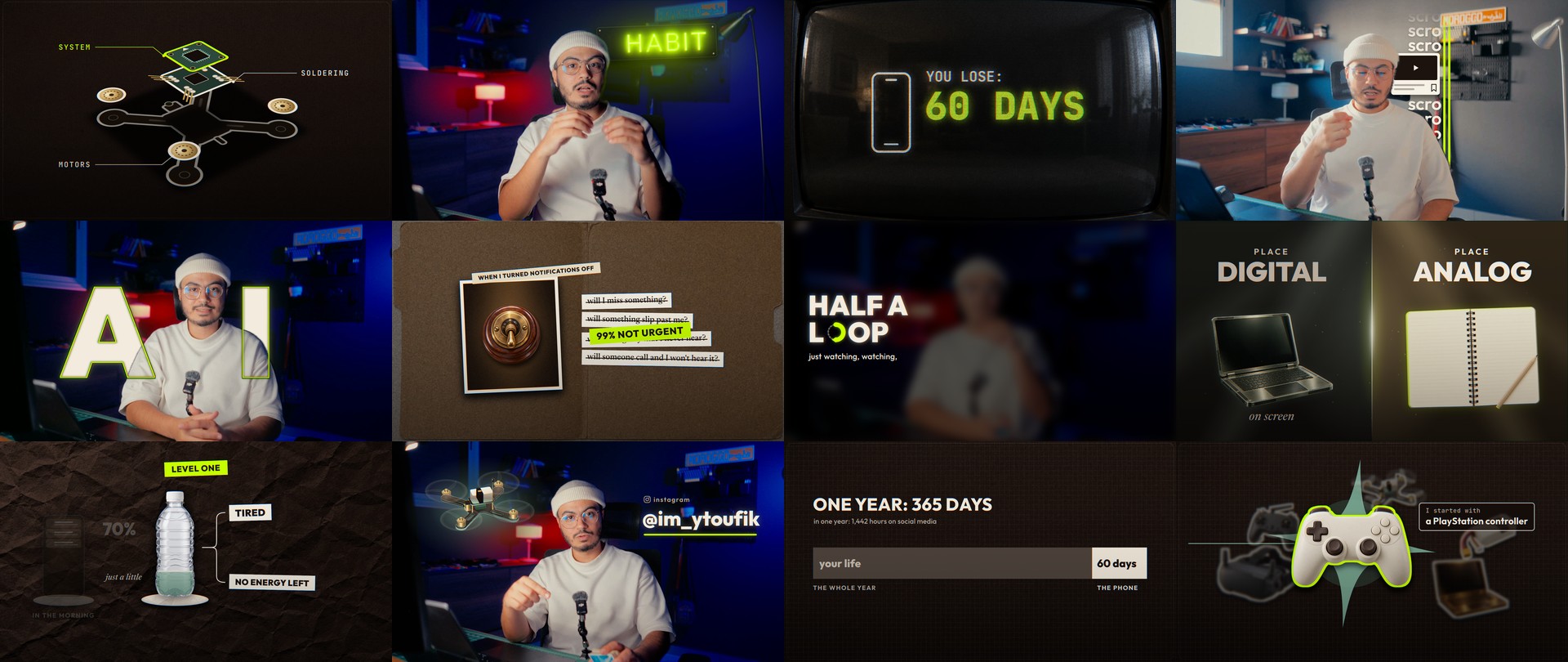
Graphics from three of my own episodes, re-rendered in English with the same kit: a few from its 12 templates, most written by my agent from its blank scaffold.
Built for
One person talking to a camera. YouTube essays, tutorials, explainers, courses. A Mac with Apple silicon or a Windows 10/11 PC, and an AI agent like Claude Code, Codex or Cursor. DaVinci Resolve Studio or Premiere Pro if you have one; no editing app needed.
Not for
Multi-camera podcasts and two-person interviews. Anyone who wants a one-click button: this is a pipeline with three decisions that stay yours.
One outsourced edit of a 15-minute video costs more than this. You keep it, and every update to it, for every video after.
Edit Studio is yours. Your purchase is confirmed.
One more thing: turn every video into carousels
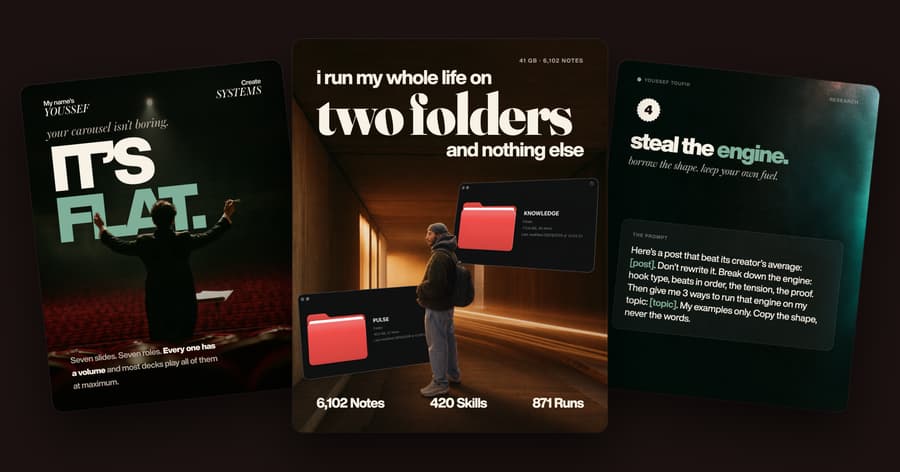
Carousel Studio is the system I use to turn one idea into branded slides, run by the same AI agent.
Add it now for $19, one click, no new checkout.
What's included
- The carousel system for your AI agent: say the idea, get a finished deck in your brand.
- A video walkthrough: from the zip to your first carousel in 5 minutes, step by step.
- Studio Live, an editor on your computer: click any line to rewrite it, drag slides into order, undo anything.
- 56 slide designs that look like real apps: terminals, chats, dashboards, Notion pages, receipts.
- 15 carousel formats, plus a guide that picks the right one for your idea.
- The Hook Engine: a 5-step cover method with two pass/fail checks, so weak covers die before you build.
- AI covers and backgrounds in your palette, on your ChatGPT plan or your own key, with a check that your headline stays readable.
- Text behind: cut the person out of your cover photo and put your headline behind them, in one click.
- A step-by-step installer for macOS, Windows and Linux, or one prompt your agent runs for you.
- Every future update, free.
$47$19one-time
Charged to the card you just used. No new form.
What's included
- Film yourself talking. Your agent syncs your mic, keeps your best takes, cuts the dead air and re-checks every join before you see it.
- Finish where you work: a finished MP4 with no editor, a DaVinci Resolve timeline you can undo, or a Premiere Pro timeline.
- Lifetime updates: every new version, template, style and fix, free.
- Step-by-step guides and a video walkthrough: the install on Mac or Windows, DaVinci Resolve, Premiere Pro and a 10-minute first run.
- The full edit pipeline as agent skills and plain shell scripts. Runs in Claude Code, Codex, Cursor or a terminal.
- One installer for everything it needs: ffmpeg, Whisper, the motion-graphics engine. On a Mac or a Windows PC.
- The tighten step: dead air judged by sound, one join rule, audio cross fades, markers to jump through.
- The self-check: a lost-words audit and fresh agents that re-listen to every join.
- A gaze map that finds every moment you look at your notes, for full-screen graphics.
- A motion-graphics kit with templates, your brand file and a local review page for your votes.
- 127 original sound effects in 34 kinds, yours to use in any video, plus a tool that sorts your own library.
- A taste file and a playbook: the editing rules learned from real reviews, tuned once, followed every time.
Sold by Youssef Toufik
Get it in a bundle


The Studio Bundle
3 products, this one included
Save 54%
Questions
What do I download?
One zip, about 12 MB: the pipeline, the skills for your agent, START-HERE, the playbook, the motion-graphics kit and the sound pack. One command installs everything it needs. The step-by-step guides are on your Start here page.
Do I get updates?
Yes, for life. Every new version of Edit Studio is free for you: new templates and graphic styles, new steps, fixes, and support for new versions of Resolve, Premiere and your agent. Whatever I add to it later comes as a free update, never a paid add-on. You get an email when one lands, and the new zip is on your Start here page. Your settings carry over in two minutes, and your videos are never touched.
Is there a guide for Resolve and Premiere Pro?
Yes. Step-by-step guides with slides cover the install on a Mac or a Windows PC, DaVinci Resolve (the one setting to turn on, where every timeline lands, the three decisions that are yours) and Premiere Pro (one line to switch it on, File > Import, versions, graphics on a Premiere cut). They are on your Start here page and in one PDF.
Do I need DaVinci Resolve Studio?
No. Without an editing app, it renders the finished video as an MP4. If DaVinci Resolve Studio (21.1 or newer, the paid version) is installed, it is used automatically: drafts are staged inside Resolve for your yes, and every change can be undone. Premiere Pro users get the cut as a timeline to import.
Does it work on Windows?
Yes. Windows 10 or 11 (64-bit), or a Mac with Apple silicon. On a Mac the gaze map uses Apple's Vision framework; on Windows the installer downloads two small open models (about 4 MB) that do the same job.
Which AI agent do I need?
Any agent that can run shell commands and read files: Claude Code, Codex, Cursor or similar. Agents that can run sub-agents in parallel make the take and double-check steps faster. Every step is also a plain command you can run yourself.
Does it work in my language?
It works in any language Whisper or Resolve can transcribe. The pipeline was built on long videos in a language most AI tools handle badly, so English is the easy case.
Do I need a separate microphone?
No. With a lav or wireless recorder, the system syncs it to your camera automatically. Without one, it uses your camera audio.
Will it mess up my project?
No. Every edit is a new version: a new timeline in Resolve, a new file otherwise. Drafts wait for your yes, and every commit can be reverted. Your footage is never copied, moved or deleted.
How long does one video take?
On the last 50-minute recording: about 2 hours from raw footage to the draft and about 3.5 hours to a double-checked tight cut, most of it transcription and agents working while you do something else. Your own time is the three reviews. Motion graphics add a few hours of agent and render time.
Can I change how it edits?
Yes. Pause length, breaths, fades and loudness live in one taste file. The graphics and sound rules live in one playbook. The agent briefs that judge takes are plain text you can edit. Colours and fonts of the graphics live in one brand file.
Get Edit Studio
$47 one time. $97 one time. Yours the moment you sign up.

Youssef Toufik